RV Park WiFi Setup: How to Design a Network That Works
Why does RV park WiFi fail so often? Usually it isn’t the internet plan. Instead, it’s the design: too few access points, one shared network for everyone and no traffic control. Good RV park WiFi starts with a site survey, wired backhaul to each zone, fair limits per guest and active monitoring.
In short
| Topic | In a few words |
|---|---|
| Main cause | Usually the design, not the internet plan. |
| Building blocks | Uplink, router, backhaul, access points and management. |
| Access points | Close to the sites, on poles, with a clear view of the rigs. |
| Bandwidth | First plan for guests online at peak, not total sites. |
| Free or paid | Both work, as long as each device has limits. |
| Ongoing work | Also monitoring, updates and seasonal capacity checks. |
Why is RV park WiFi so often slow?
WiFi matters to campers more than many owners expect. In fact, KOA found that campers who rely on WiFi or cell service while camping tend to camp longer, up to nine extra days a year.
However, most parks lose that advantage because of a few design mistakes:
- Repeaters instead of backhaul: each wireless repeater hop eats into usable capacity, so the far end of the park gets a fraction of the speed.
- Access points in the office: one strong unit at the clubhouse can’t reach metal RVs several rows away.
- One flat network: guests, cameras and office computers share the same segment, so one device can slow down everyone.
- No traffic control: a few large downloads or video uploads take over the whole uplink.
- No monitoring: the owner learns about outages from guest complaints.
What does a good RV park WiFi network include?
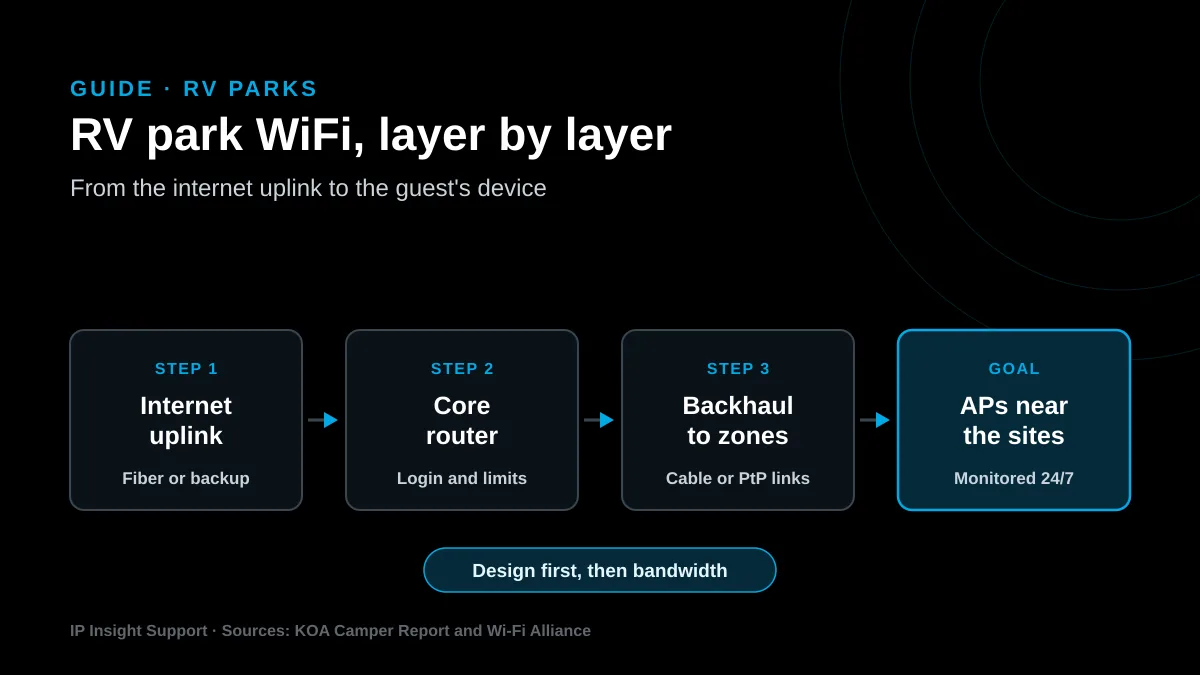
A network that holds up through peak season has five layers, and each one has a clear job.
- Internet uplink: fiber when it’s available; otherwise fixed wireless or satellite, ideally with a second link as backup.
- Core router: handles guest login, per-device limits, traffic shaping and separation between guest, staff and camera networks.
- Backhaul: fiber or point-to-point radio links that carry traffic from the office to each zone of the park.
- Access points: outdoor units near the sites, on poles or buildings, with overlapping coverage.
- Management: monitoring, alerts and remote updates for every device.
Newer outdoor access points help as well. For example, Wi-Fi 6 was built for stronger performance in dense environments, and it lets an access point serve more devices at the same time, according to the Wi-Fi Alliance.
How much bandwidth does an RV park need?
There’s no single number, because demand depends on how many guests are online at the same time, not on the total number of sites. A full, rainy weekend looks very different from a quiet Tuesday.
So a better method is to estimate peak concurrent users first. Then add headroom for streaming and video calls. Finally, size the uplink and set per-device limits, so no single guest can take it all.
Also, measure real usage during the first season. Monitoring data shows when the uplink saturates and whether the right fix is more capacity or better traffic control.
Where should RV park WiFi access points go?
Put access points close to the guests, not in the office. After all, RVs are metal boxes, and a signal that crosses several rows of rigs and trees arrives weak.
- Mount access points on poles or buildings with a direct view of the sites.
- Cover each row or loop from at least one nearby access point, with some overlap for roaming.
- Feed each access point with cable or a dedicated point-to-point link, not a repeater.
- Use 5 GHz for capacity, and keep 2.4 GHz for range and older devices.
- Run a site survey before you buy hardware, and repeat it after big changes.
For longer runs between zones, our wireless link optimization service covers alignment, channel planning and interference.
Should RV park WiFi be free or paid?
Both models work. What matters is control. A login portal lets you show terms, offer tiers and limit each device, so a few heavy users don’t ruin the experience for everyone else. Our centralized HotSpot service covers that layer.
Free WiFi with fair limits tends to read better in reviews. On the other hand, paid tiers make sense when guests stay longer and work remotely. In either case, keep guest traffic separate from office and camera networks.
How do you keep it working all season?
- Monitor every access point, link and uplink, with alerts to your phone.
- Apply updates on a schedule, outside peak hours.
- Use intelligent queue management, so video calls and browsing stay responsive under load.
- Review usage after each busy weekend, and then adjust limits.
- Keep spare power supplies and outdoor access points on site.
A network monitoring platform turns those checks into a routine instead of a guess.
How do we handle it at IP Insight Support?
First, we run a site survey and audit what’s already installed. Then we design the backhaul, place access points by row and set up guest login, limits and monitoring. For RV parks, campgrounds and hotels, our NETXIOM managed WiFi line adds 24/7 monitoring and NETXIOM FlowEQ, intelligent queue management, to keep the network responsive at peak. Learn more about NETXIOM managed WiFi for RV parks and how we work with RV parks and campgrounds.
RV park WiFi frequently asked questions
Can I use repeaters to extend RV park WiFi?
They can patch one or two weak spots, but they aren’t a design. Each wireless hop reduces usable capacity, so it’s better to feed access points with cable or point-to-point links.
Do I need fiber for good RV park WiFi?
Fiber is the best uplink when it’s available. However, many rural parks run well on fixed wireless or satellite, as long as the design inside the park is solid and there’s a backup link.
How many access points does an RV park need?
It depends on the layout, the trees and how close the sites are. A site survey shows the real number; as a rule, each row or loop should see at least one nearby access point.
Should guests and staff share one network?
No. Instead, separate guest, staff and camera networks, so a guest device can’t reach the office or slow down security cameras.
Can I charge for faster WiFi?
Yes. A login portal can offer free and premium tiers with different limits per device. In addition, it helps you show terms of use to every guest.
What should I check first when guests complain?
First, check whether the uplink is saturated at peak hours. Then check the signal at the sites with complaints. Together, those two tests usually show whether you need more capacity, better placement or traffic control.
Planning or fixing the WiFi at your RV park? Talk to an engineer and let’s review your park.
More guides for network operators
MikroTik vs Ubiquiti: Which Is Better for a WISP?
Read the guide