What Is CGNAT and When Does an ISP Need It?
What is CGNAT? It’s address translation performed by the internet provider inside its own network, so many subscribers can share the same public IPv4 address. An ISP needs it when it no longer has enough IPv4 addresses to grow. However, CGNAT only eases the shortage: the long-term answer is IPv6.
In short
| Topic | In a few words |
|---|---|
| What it is | Carrier-Grade NAT, also called NAT444. |
| Internal range | 100.64.0.0/10, reserved by RFC 6598 for this use. |
| When it’s used | When there aren’t enough public IPv4 addresses for new subscribers. |
| What it limits | Inbound connections, port forwarding and the shared IP’s reputation. |
| What it requires | Logging public IP, port and time to identify each subscriber. |
| Long-term answer | IPv6, usually in dual stack while the transition lasts. |
What is CGNAT and how does it work in an ISP network?
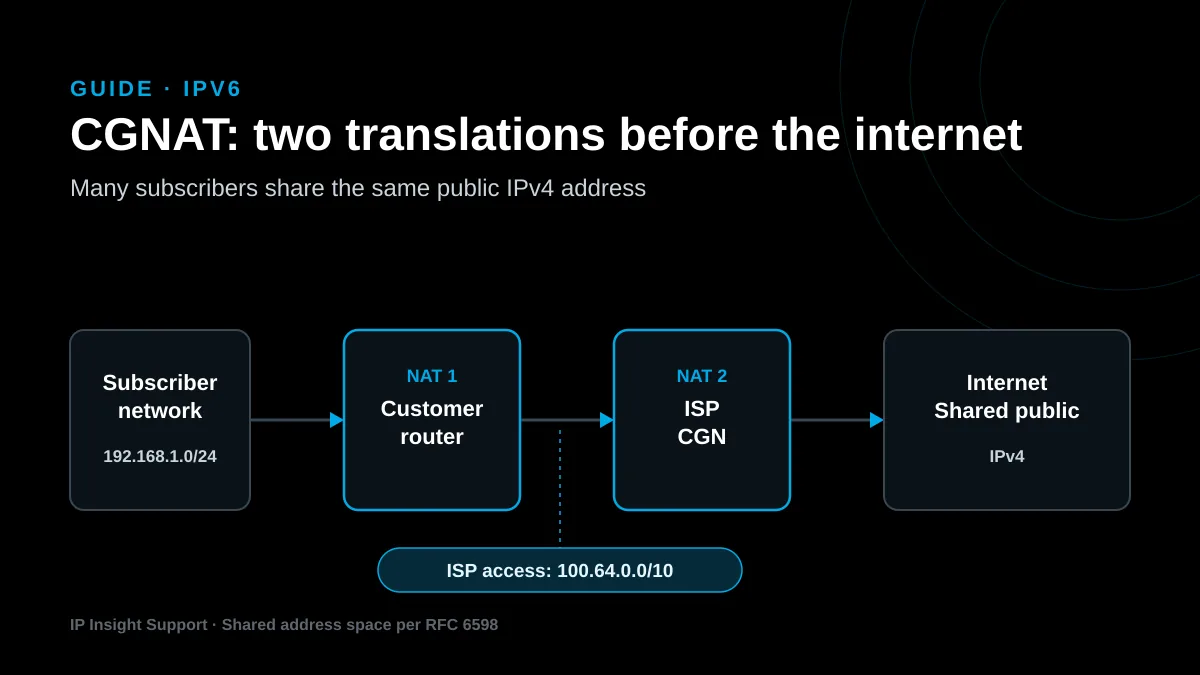
CGNAT adds a second address translation inside the operator’s network. As a result, a subscriber’s traffic goes through two NATs before it reaches the internet.
First, the customer’s router translates its local network, for example 192.168.1.0/24, to an address the ISP assigns from the 100.64.0.0/10 range. Then the CGN device in the core translates that address to a shared public IPv4 address. That way, hundreds of customers can reach the internet with only a few public addresses.
The 100.64.0.0/10 range isn’t arbitrary. RFC 6598, published in April 2012, reserved it so operators can number the links between the CGN and their customers’ equipment. The standard also states that these addresses must not cross the provider’s network boundary.
To share one public IP, the CGN uses ports. Each IPv4 address has 65,535 ports per protocol, and the CGN assigns a share to each subscriber. In fact, RFC 6888, from April 2013, requires the device to let you limit external ports per subscriber. It also asks that, by default, each customer keeps the same public IP across all of its sessions.
When does an ISP need CGNAT?
An ISP needs CGNAT when its subscriber base grows faster than its IPv4 address supply. In Latin America and the Caribbean, this is now the normal situation.
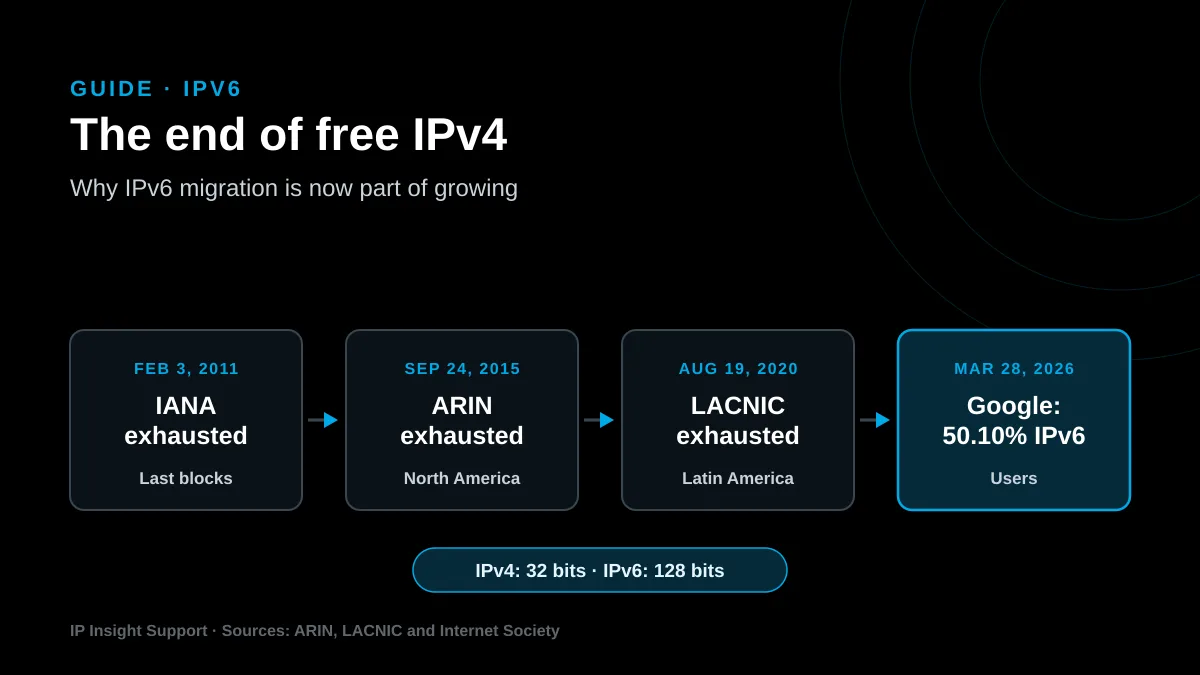
According to LACNIC, its IPv4 address pool ran out on August 19, 2020. Since then it only distributes returned or recovered blocks through a waiting list. In the final phase, each new organization can receive a single allocation, from a /24 to a /22.
These are the signs that your network already needs CGNAT:
- Your public IPv4 pool is almost full and there’s no new block in sight.
- Every new subscriber uses a public IP you can no longer replace.
- Buying or leasing IPv4 on the market doesn’t fit your growth plan.
- Your IPv6 rollout doesn’t reach every customer yet.
What problems does CGNAT cause for subscribers?
Understanding what CGNAT is also means knowing its side effects. The main problem is that the subscriber is no longer reachable from the internet. Because the public IP is shared, inbound connections don’t reach the customer’s network without a special rule on the CGN.
RFC 6269, from June 2011, documents these address-sharing effects. In practice, these are the most common complaints:
- Port forwarding: cameras, recorders, servers and inbound VPNs stop working from outside.
- Shared reputation: if one customer sends spam, the public IP can end up on blocklists and affect everyone.
- Geolocation: services locate the user less accurately, because the IP represents many customers.
- Demanding applications: some online games and peer-to-peer calls connect with more difficulty.
That’s why many operators keep a small pool of public IPv4 addresses. They can offer a dedicated IP to customers who truly need one, while everyone else browses through CGNAT.
What must an ISP log when it uses CGNAT?
An ISP using CGNAT must log the public IP, the port and the time of every translation. Without those three data points it can’t tell which subscriber was using a shared IP at a given moment.
RFC 6888 lists the protocol, the subscriber identifier, the external address and port, and the timestamp as a reference. At the same time, it recommends not logging the destination of each connection, unless regulation requires it, for privacy reasons.
That log volume grows fast. With deterministic NAT, described in RFC 7422, each subscriber gets a fixed port range and keeping the configuration is enough. Either way, the retention period depends on each country’s regulation, so it’s worth confirming with the local authority.
CGNAT or IPv6: do you have to choose?
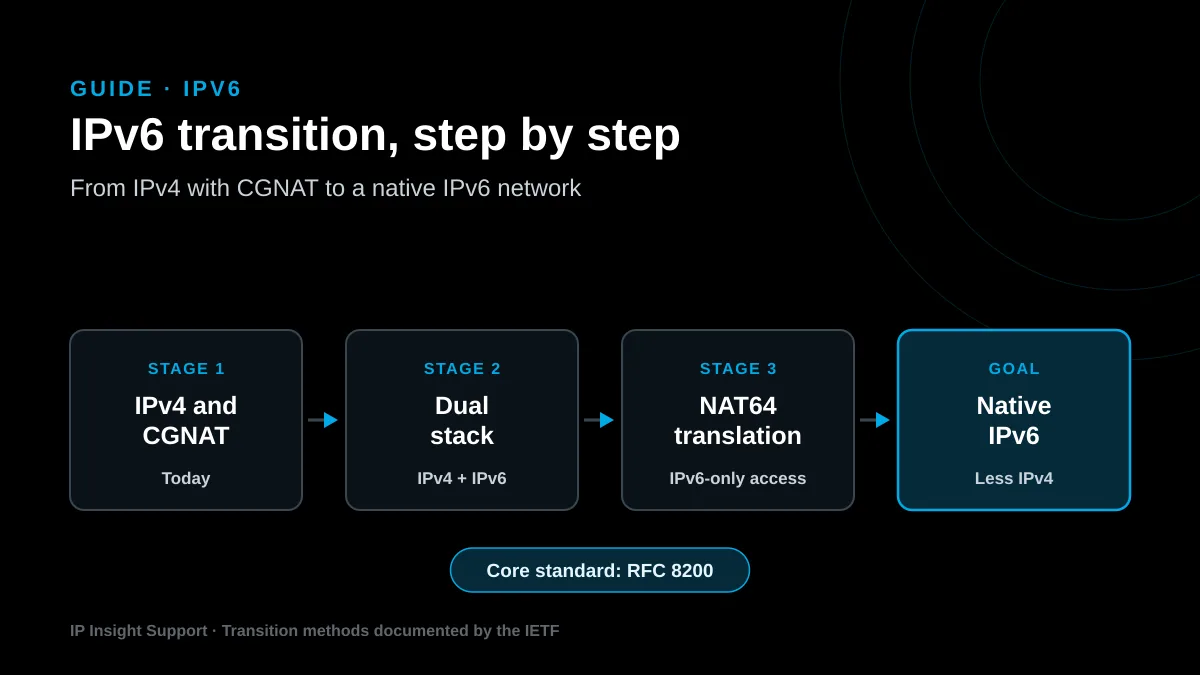
You don’t have to choose, because they play different roles. CGNAT buys time for the IPv4 network, while IPv6 removes the need to share addresses.
In fact, both work well together in dual stack. Traffic to IPv6-enabled services leaves natively and doesn’t go through the CGN. As a result, the device carries less load, uses fewer ports and generates fewer logs. To go deeper, read our guide on why ISPs must migrate to IPv6.
What should you size before deploying CGNAT?
Knowing what CGNAT is isn’t enough to deploy it well. Before you turn it on, size ports, sessions and logging. If any of them falls short, customers experience it as intermittent connection failures.
- First, the public pool: how many IPv4 addresses you dedicate to the CGN and how many subscribers share each one.
- Next, ports per subscriber: a fixed limit keeps a single customer from exhausting the shared IP.
- Then, device capacity: concurrent sessions and new connections per second at peak hour.
- Also, logging: storage and retention, or deterministic NAT instead.
- Finally, exceptions and the IPv6 plan: which customers get a public IP and when IPv6 reaches the whole network.
How do we handle it at IP Insight Support?
If your team already knows what CGNAT is but needs to size or deploy it, we can help. At IP Insight Support we treat it as part of a transition plan, not a patch. First we audit actual address and port usage. Then we design the CGN, the public-IP exceptions and the logging. We also get IPv6 running so the network depends less and less on IPv4. Learn about our network migration and IPv6 service.
CGNAT frequently asked questions
Does CGNAT slow down the connection?
Not necessarily. CGNAT adds a translation step in the core, and with properly sized equipment users don’t notice it. Problems appear when the CGN runs out of ports or sessions, which is why sizing is key.
How can a subscriber tell if they are behind CGNAT?
Check the router’s WAN IP. If it falls between 100.64.0.0 and 100.127.255.255, or doesn’t match the public IP shown by any online IP checker, the connection goes through a provider NAT.
Can 10.0.0.0/8 be used instead of 100.64.0.0/10?
Technically yes, but it isn’t recommended. If a customer uses the same private range on their internal network, routing conflicts appear. That’s why RFC 6598 reserved 100.64.0.0/10 for this use.
How many subscribers fit behind one public IPv4 address?
It depends on how many ports you assign to each. For example, if you reserve ports 1024 to 65535, which is 64,512 ports, and hand out blocks of 2,016 ports, 32 subscribers fit per IP for each protocol.
Can some customers get a public IP and the rest use CGNAT?
Yes, and it’s the most common setup. The ISP keeps a small pool of public IPv4 addresses for customers who need inbound connections, such as cameras, servers or VPNs, and uses CGNAT for everyone else.
Does CGNAT replace migrating to IPv6?
No. CGNAT extends the life of IPv4, but it adds equipment, logging and support costs. IPv6 gives every customer plenty of addresses, so the ideal is to run both in dual stack while the transition moves forward.
Does your network need CGNAT, IPv6 or both? Talk to an engineer and let’s review your case.
More guides for network operators
IPv6 Migration: Why ISPs Can’t Afford to Wait
Read the guide